



AI assistants are knocking on businesses’ doors
29 October 2026
Picture a sales manager. They take out their phone and ask ChatGPT a question. The answer isn’t bad, but it doesn’t help. The only thing on their mind is “I wish it knew the customers in our CRM too.” This small scene sums up the most important change in the AI world over the past year. Assistants are now very smart, but they know nothing about your company. The way to introduce them to your company’s data runs through MCP.
MCP stands for Model Context Protocol. The name sounds technical, but the idea is quite simple. In this article we try to explain MCP from a business owner’s point of view, without drowning it in technical terms.
What is MCP?
Put simply, MCP is a common language that AI assistants use to connect to external systems. Anthropic released the standard as open source in November 2024. At first some saw it as “just another company’s own standard”, but things moved fast. OpenAI added MCP support to ChatGPT in March 2025, followed by Google and Microsoft. In December 2025 the protocol was handed over to the Agentic AI Foundation, set up under the Linux Foundation. In short, MCP no longer belongs to a single company; it is a shared standard for the whole industry.
We usually explain it with the USB-C example. Every phone used to have its own charging cable; now one cable fits them all. MCP does the same job on the AI side. You build an MCP server for your system once, and every assistant that supports MCP can use it.
The numbers show how widespread it has become. According to the protocol’s official blog, in December 2025 the MCP software kits were downloaded more than 97 million times a month and there were over 10,000 active MCP servers. Today tools such as ChatGPT, Claude, Gemini, Microsoft Copilot, Cursor and Visual Studio Code all work with MCP.
What problem does MCP solve?
AI models know history, software and law. But they cannot know which of your products is still in stock, what a customer asked for last month or which quote is still waiting for approval. That information lives in your CRM, your ERP and your Excel files, and the assistant has no way to get there.
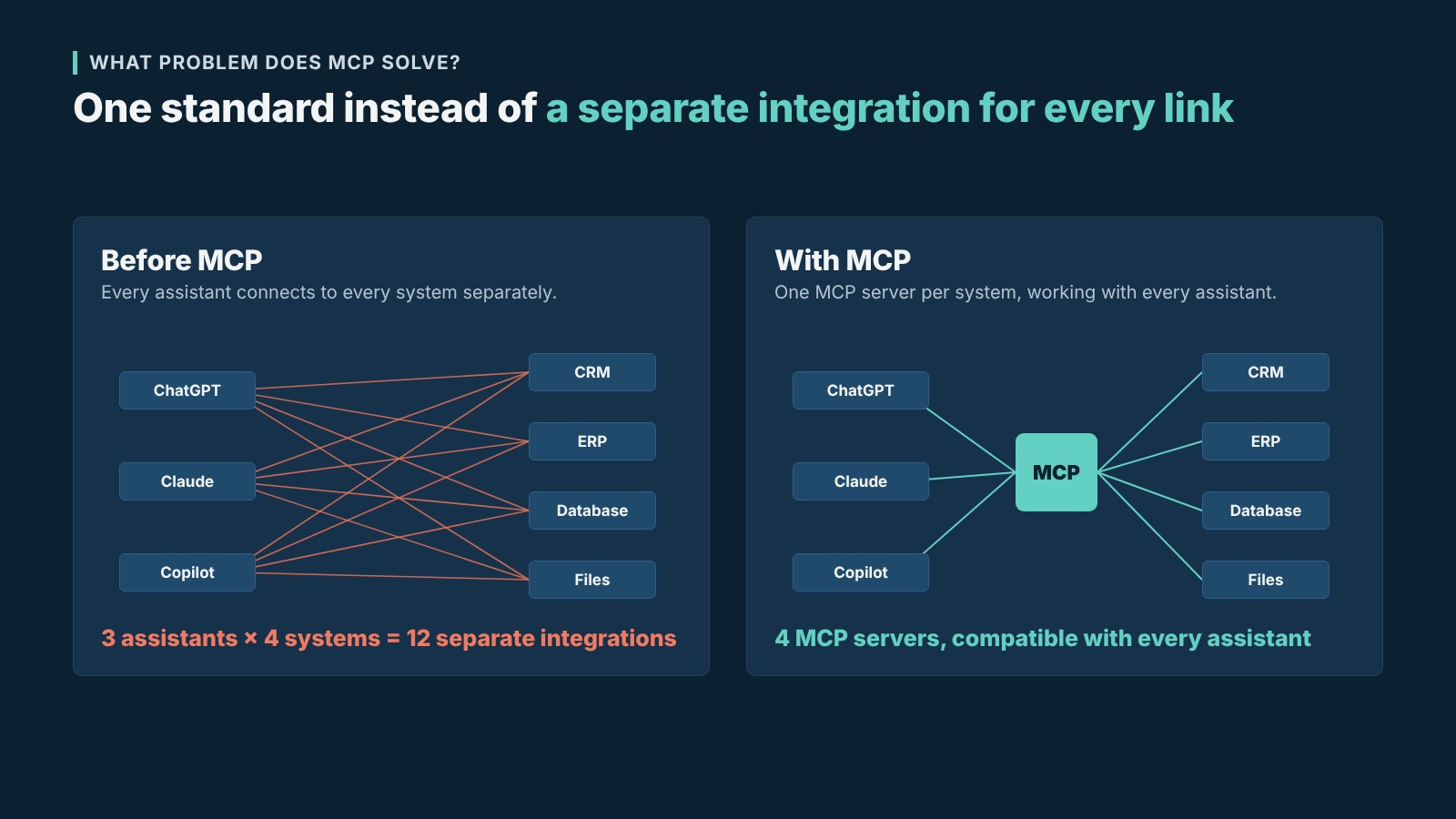
Before MCP, a company that wanted to open that path had to commission a separate integration for every AI tool. With four systems and three different assistants, that meant twelve separate integrations. Expensive, and a real headache to maintain. MCP changes the maths. You write one server per system, and that server can talk to every assistant.
The good part is that, once connected, the assistant stops being a chat tool that talks in general terms. It becomes a teammate that answers by looking at your data and, when needed, gets work done on your behalf.
How does MCP work?
There are three parts behind the scenes. The first is the AI application the user talks to, such as Claude, ChatGPT, Copilot or an assistant built in-house. Technically this is called the host. Inside the host there is a small component that runs and opens a separate connection to each MCP server; we call it the client. The third, and the most important for you, is the MCP server. Think of the server as your system’s door to AI. It decides which data can be read and which actions can be taken.
A server can offer the assistant three kinds of things. Tools do a job, such as opening a customer record or checking stock. Resources provide data to read, such as a product catalogue or price list. Prompts are ready-made templates for frequent tasks.
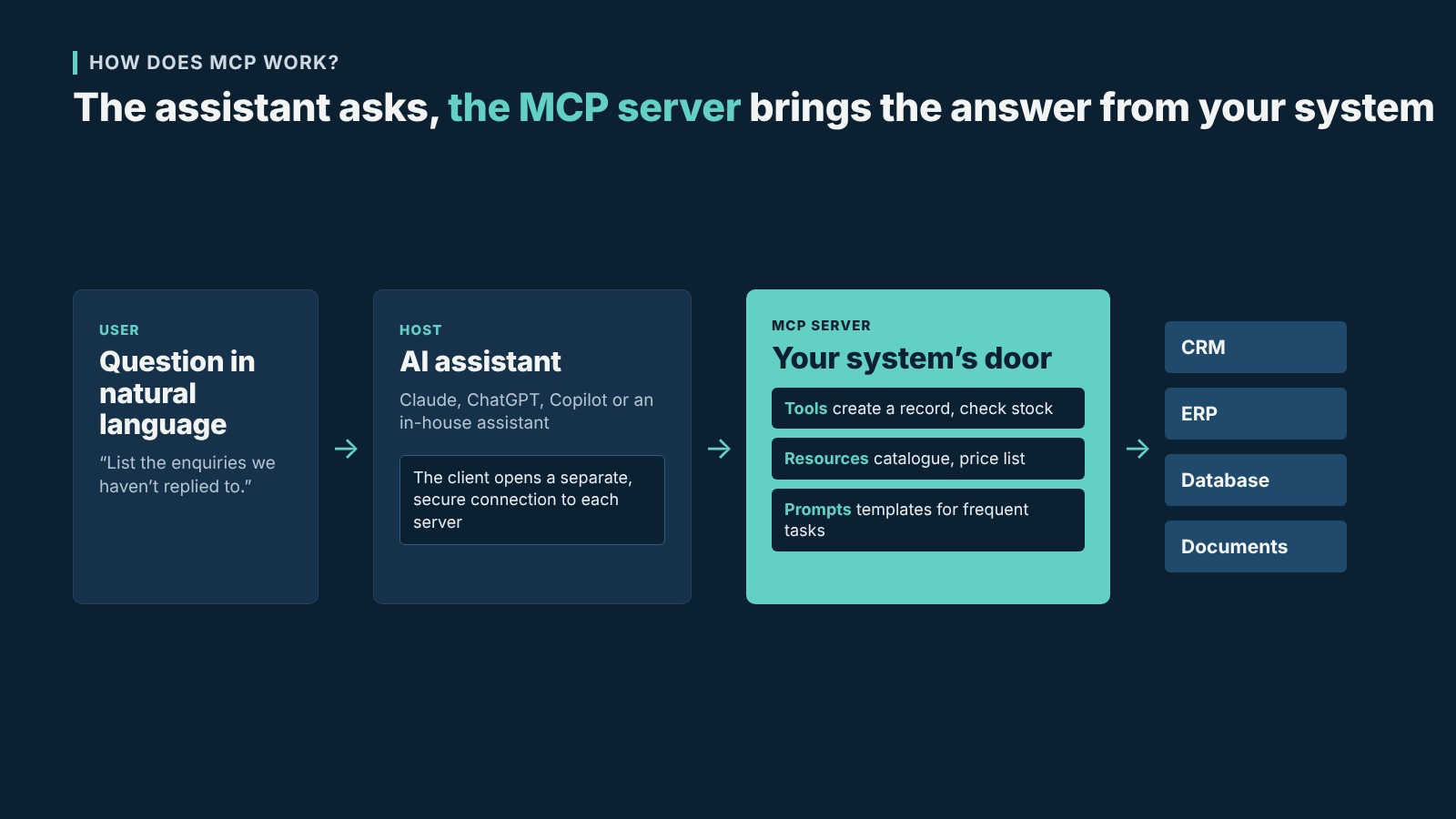
Here is what it looks like in real life. A sales rep types to the assistant: “List last week’s enquiries we haven’t replied to yet.” The assistant checks the connected servers, finds the tool on the CRM server that lists enquiries, runs it with the right filters and brings back a tidy list. The rep finishes the job without opening a single screen.
For those curious about the technical details: communication runs over JSON-RPC 2.0. The server can run on the same computer or be offered as a remote service over the internet. For companies we usually prefer remote servers with authentication.
Why every company needs an MCP strategy
It would be misleading to see MCP as something that only concerns software companies. Every business that holds customer data, has a sales team or offers a product or service catalogue will be affected by this change. There are a few reasons for this.
Your team is already using AI
Many of your employees work with an assistant today, whether you know it or not. When the assistant cannot reach company data, one of two things happens. Either the employee copies the customer list and pastes it into the chat window, which is a serious data security problem, or the assistant gives generic, useless answers. With a controlled MCP connection, you decide which data is used, by whom and under which rules.
Your customers will ask assistants about you too
In October 2026 Google announced Connected Apps, a platform that lets businesses connect their own services to Google Search and Gemini. That connection also runs on MCP, and ChatGPT has a similar setup. So very soon a customer will ask an assistant about your product or your booking calendar without ever visiting your website. Just as businesses without a website fell behind fifteen years ago, those missing from this channel may face something similar.
Build it once, it works everywhere
Because MCP is an open standard, a server written today will also work with the assistants released tomorrow. Your team uses Claude today and may switch to Copilot next year by company decision. You don’t need to touch your server. Not being locked into one provider is a big relief in the long run.
Your old software gains new value
You don’t have to throw away the CRM or custom software you have used for years. An MCP layer placed in front of it makes the same system usable in natural language. The data you have built up over the years becomes this easy to query for the first time.
How do companies use MCP?
The real benefit of MCP shows up in day-to-day work. A few concrete examples say it best.
The favourite use in sales teams is follow-up. A rep says: “Show me, in order of priority, the customers we quoted this month who haven’t replied, and draft a short follow-up email for each.” The assistant pulls the data from the CRM, sorts it and puts the drafts in front of them. Work that would normally take half a day is done in a few minutes.
Yacht brokerage looks similar. With a single sentence, a broker can search for boats that match a buyer’s criteria in both their own portfolio and the international listing database, and see the boat’s price history and who has shown interest before, all in the same conversation.
In customer service, support staff can get an order’s status, warranty details and past service records with one question. Managers can ask “Which region’s sales fell compared with last quarter, and what might be the reason?” and get a summary with commentary. Field teams can look up and update work orders from their phones. And a new hire can ask the assistant directly instead of digging through folder after folder to find a procedure.
How should you plan your move to MCP?
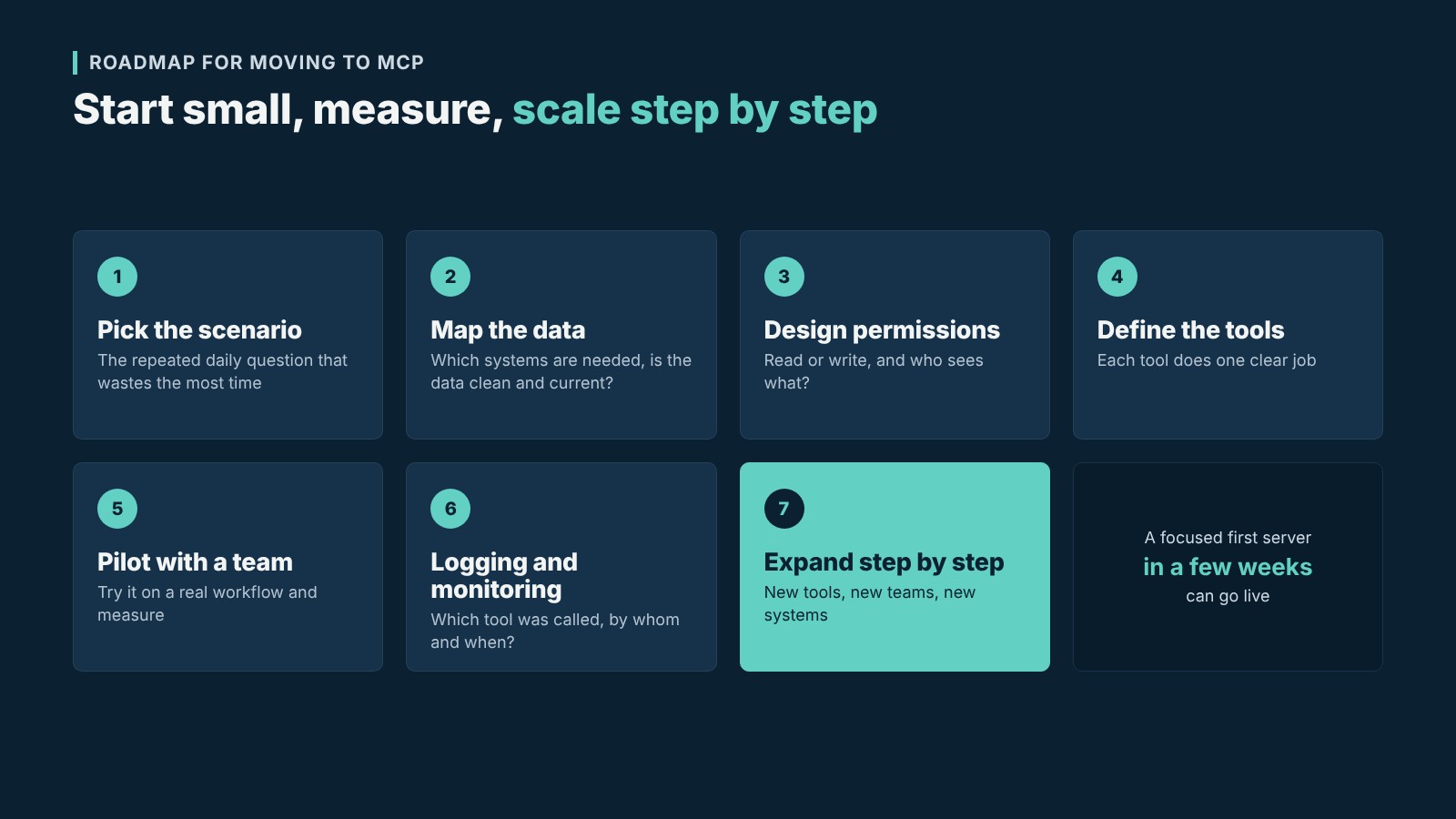
The projects that work best start small. Instead of trying to connect everything at once, pick the one workflow where the most time is lost. If there is a question your team asks again and again every day, the first server should answer it.
Next we look at which systems need to be accessed for that question. How clean and up to date the data is matters a lot here, because the assistant can only answer as well as the data it can reach. Then we talk about permissions. Will the assistant only read, or will it also be able to create records? Will a sales rep and the general manager see the same data? The answers to these questions should be clear at the very start of the project.
When defining tools, we make sure each one does a single, clear job. Clear definitions such as “search customer”, “create quote” and “check stock” make it easier for the assistant to pick the right tool. When it is ready, we try it on real work with a small team and measure which questions are answered well and where improvement is needed. Along the way we set up monitoring that records which tool was called by whom and when. Once the first scenario has settled in, new tools and new teams are added step by step.
How is security handled in MCP?
It needs to be said clearly. MCP means opening a door for AI into your company systems. How that door is locked is perhaps the most important part of the project.
A few risks keep coming up in the Cloud Security Alliance’s MCP security guide and in examples across the industry. The first is what is called tool poisoning. Instructions hidden in the tool descriptions of an untrusted server can steer the assistant into leaking data. Another is tools that change later. If the definition of a tool you approved once is changed afterwards, the new version inherits the trust of the old approval. Servers running with broader permissions than necessary, packages downloaded from the internet with no known source, sessions left open for long periods and keys stored in plain text are also common problems.
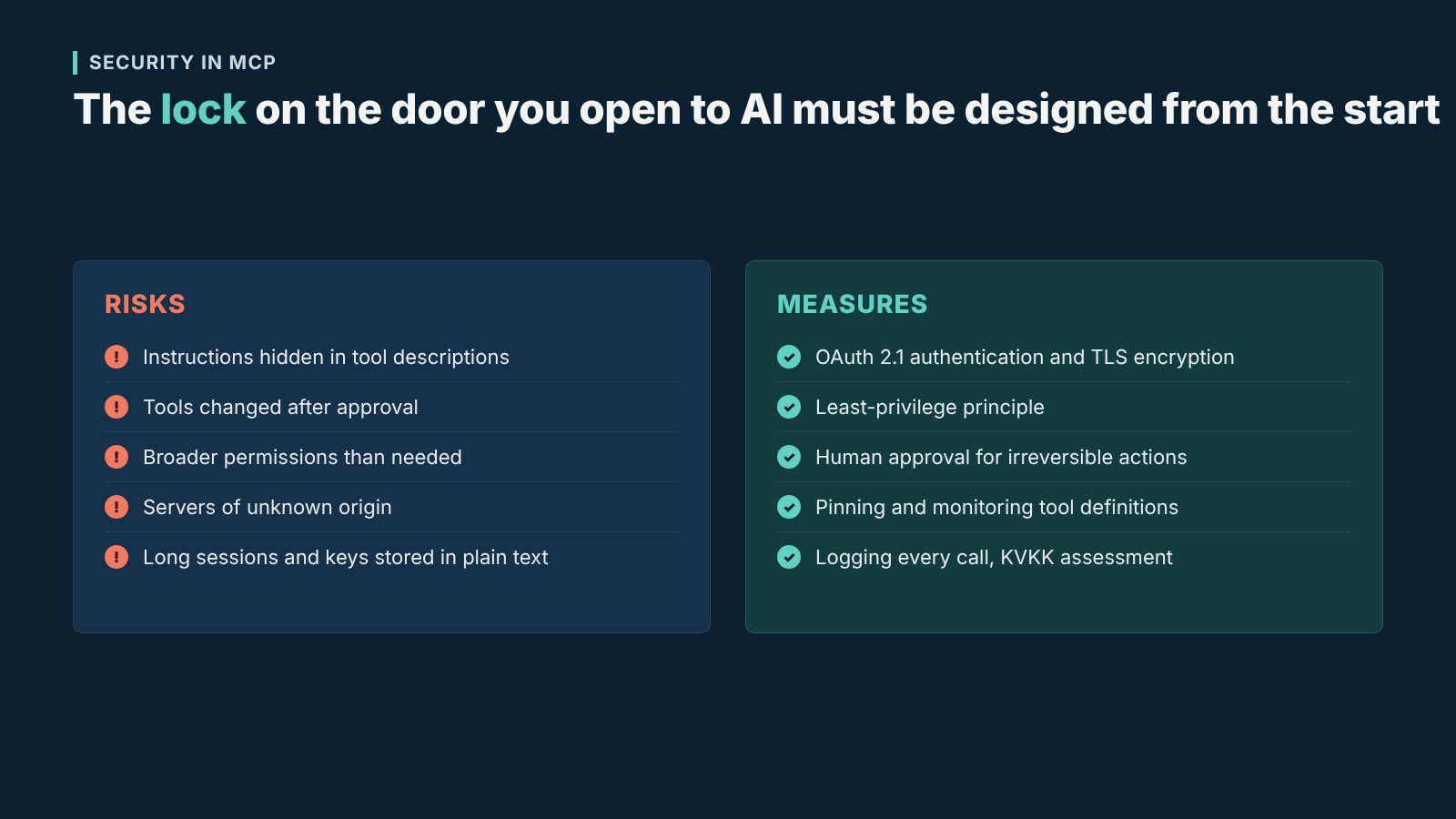
Fortunately the countermeasures are well known. Authentication with OAuth 2.1 and encryption with TLS on remote servers are the foundation. Each server should get only the permissions it needs; there is no point giving write access to a tool that only reads. For irreversible actions such as deleting, payments or bulk email, we always require a human to approve. We pin approved tool definitions and monitor changes. For critical systems we prefer to write the server ourselves rather than use an off-the-shelf package. In projects that handle personal data, we assess compliance with Türkiye’s data protection law (KVKK) from the very start and make clear which data goes to which AI provider.
What is the difference between MCP and an API?
MCP doesn’t replace APIs; it is built on top of them. An API is the technical interface software uses to talk to other software, and each one has its own rules. MCP is a layer that lets AI understand these interfaces and use them correctly. Behind the scenes an MCP server usually calls APIs you already have. The difference is that it describes what the tools do in a language the assistant understands, and does so the same way for every assistant.
That is why companies with a solid API infrastructure move to MCP much faster. For older systems without an API, you first need a layer that can safely expose the data.
Frequently asked questions
Is MCP only for large companies?
No. Even a five-person team can save a lot of time by safely opening its customer list, quote files or stock information to an assistant. In small businesses a single well-designed server is often enough.
Do we need to replace our existing software?
Usually not. An MCP server is a layer added in front of your existing system. If your software has an API, or secure access to its database can be provided, it can be set up without changing the system.
Which AI assistants support MCP?
Almost all of the widely used platforms, led by Claude, ChatGPT, Gemini, Microsoft Copilot, Cursor and Visual Studio Code. Because the standard is open, new ones join the list every month.
Does our data go to AI companies?
The server passes the assistant only the data needed to answer the question asked, and you decide what is shared when the server is designed. On business plans, AI providers commit not to use this data to train their models. Even so, where sensitive data is involved, we recommend checking which provider you work with and under which contract terms.
Can AI delete a record by mistake?
With a well-designed server, that is very unlikely. You can leave out a delete tool entirely, or make critical actions depend on user approval. Because permission limits are set on the server side, the assistant cannot perform an action that has not been opened to it.
How long does an MCP project take?
It depends on the scope. A focused server that gives read access to a single system can go live in a few weeks. Enterprise projects that connect several systems, create records and include detailed authorisation can take a few months.
Is it safe to use ready-made MCP servers?
You can confidently use the official servers of services such as Google Drive, Slack or GitHub. With community servers whose authors are unknown, you need to be careful. For systems specific to your company there is no ready-made server anyway; it has to be written for your needs.
How are MCP and Google Connected Apps related?
Connected Apps, announced by Google in October 2026, uses MCP to connect businesses’ services to Google Search and Gemini. An MCP server you build today could become a new way to reach your customers once the platform opens in Türkiye.
How does Bilişim Atölyesi support MCP projects?
Since 2009 we have been developing custom software, CRM systems and API integrations for businesses. MCP has been a natural continuation of that work for us, because a good MCP server is really a software project that understands business processes, structures data correctly and thinks about security from the start.
We usually begin with a needs analysis. Together we identify which of your workflows can be sped up with assistants and set the priorities. Then we develop an authorised, logging server for your CRM, ERP or custom software. We add an MCP layer directly to systems that have an API, and for those without one we first build the data access infrastructure. Authentication, permission limits, human approval and monitoring are part of the project from the very beginning.
We follow the same path in our own products. For customers using products such as Yacht Brokerage CRM, Configurator, My Brand and Field Management, we are making the MCP connection ready to use. Once the project is complete, we train your team and continue with maintenance and development.
If you would like to talk about how to bring your company’s data together with AI assistants safely, write to us. In the first meeting we listen to your current systems and priorities and suggest a starting point that suits you.
Sources: Official MCP blog, Wikipedia, Model Context Protocol, Cloud Security Alliance MCP security guide, TechCrunch